SnailBom BOM Check: Turn “Eyeballing Tables” into a “One-Click Checkup”
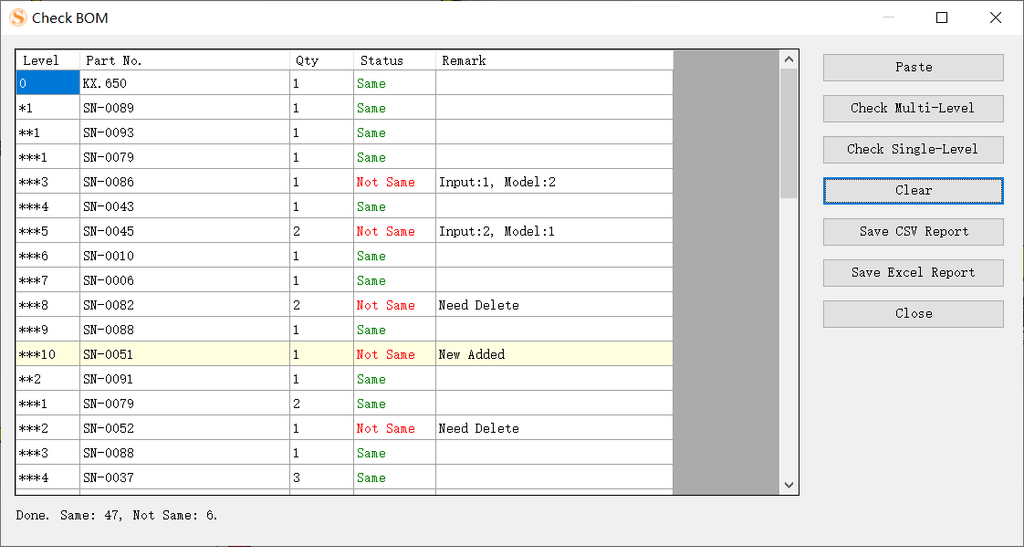
Open your assembly with SnailBom → paste an Excel BOM → click one button → all differences are highlighted.
Here’s what it looks like in action:
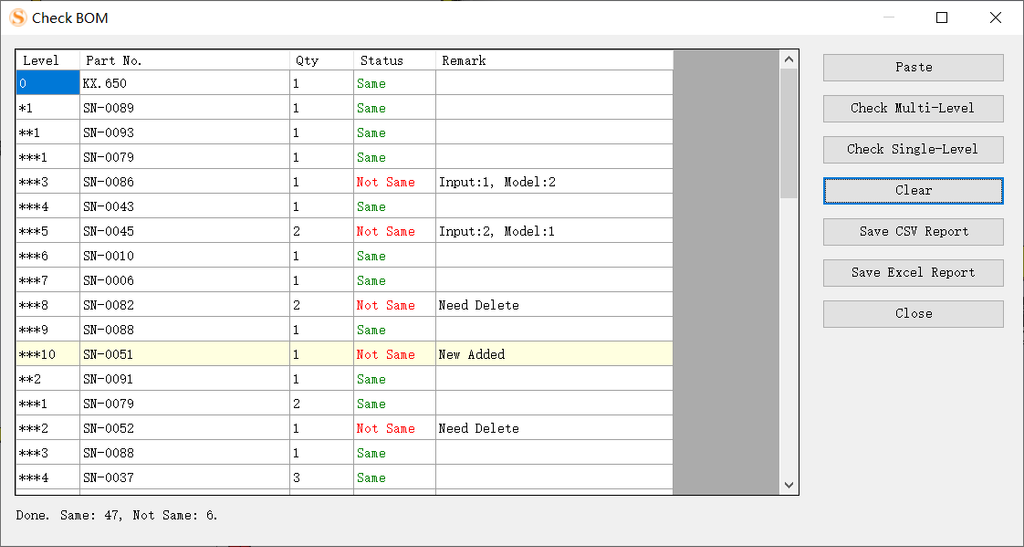
At a glance:
- 🟢 Green Same: Quantities match, no action needed
- 🔴 Red Not Same: Quantity mismatch, or items to add/delete
- 🟡 Light yellow New Add: Present in the model but missing from your sheet → add it
The status bar tells you directly: “Done. Same: 47, Not Same: 6.” — 6 issues out of 53 rows, crystal clear.
6 Buttons, 3 You’ll Actually Use
There are only 6 buttons on the right side, but you’ll mostly use just 3.
📋 Paste — One-click paste from Excel
Select your BOM table in Excel (3 columns: Level / Part No. / Qty), press Ctrl+C, switch back and click Paste. The whole table goes straight in.
✅ Check Multi-Level — Compare by structure (most common)
Works for most scenarios. Compares item by item following the BOM hierarchy — parent to parent, child to child, no mixing.
✅ Check Single-Level — Compare by part aggregation
Great for purchase lists where you only care about “total usage.” Identical parts across different levels are merged and counted as a total.
📤 Save CSV Report / Save Excel Report
- CSV: Lightweight, UTF-8 encoded, opens anywhere
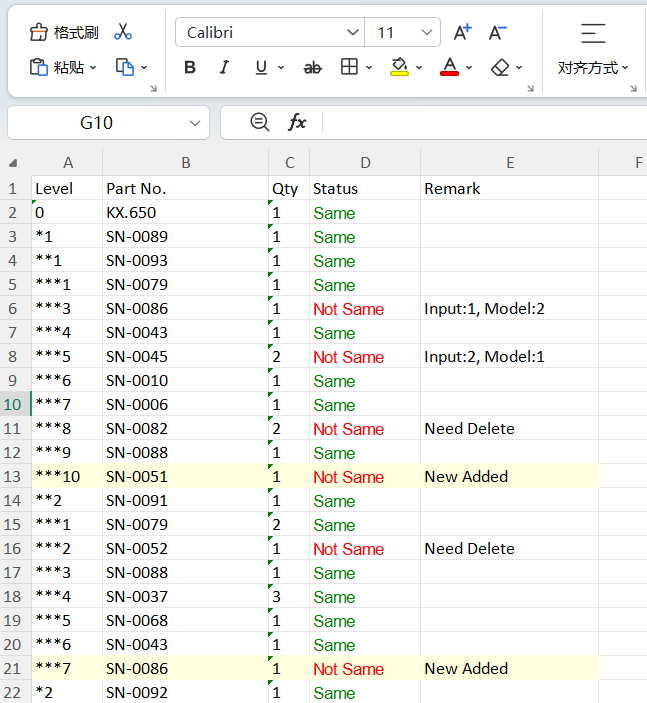
- Excel: Keeps color markings (green text, red text, light yellow background) — send it to a colleague and they’ll get it instantly
The other two: Clear (start over), Close (close the window).
What Pain Points Does It Solve?
| Your Pain Point | Check BOM’s Solution |
|---|---|
| Quantity mismatch, hunting by eye | Flags it in red: Input:1, Model:2 |
| Extra rows in sheet, not in model | Marks Need Delete — tells you which row to remove |
| New parts in model, missing from Excel | Light yellow New Add — reminds you to add them |
| 500–600 row BOM, too much to check | Scans in 5 seconds, status bar reports totals |
| Need to share results with others | Export colored Excel — instantly understandable |
| Only want to check one sub-assembly | Copy that fragment from Excel — no need to paste the whole sheet |
A Real Example
Top-level assembly XX_650 in a project. User pastes a 53-row BOM. Clicks Check Multi-Level. Result:
- 47 rows Same ✅
- 6 rows Not Same ❌
- 3 quantity mismatches (e.g., SN-0086: sheet says 1, model has 2)
- 2 to delete (e.g., SN-0082, SN-0052)
- 1 to add (SN-0051, in model but missing from sheet)
From “open Excel, switch windows, compare line by line” to “5-second result, export Excel, send email” — the whole process takes less than a minute.
Summary
BOM comparison is, at its core, repetitive work. And repetitive work should be handed to tools.
SnailBom’s Check BOM doesn’t show off or overcomplicate. It simply takes a task engineers do several times a week — half an hour each time — and compresses it into 5 seconds.
Your time should go into design, not into checking spreadsheets.